

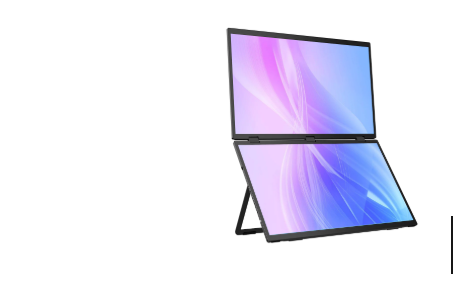
Foldable Monitors
In the fast-paced startup world, every dollar counts. Founders and small teams are constantly searching for ways to reduce hardware costs without compromising productivity or performance. One emerging solution that’s gaining attention is the use of portable and foldable monitors, particularly from UPERFECT, a company leading the charge in flexible display technology.
The Hidden Costs of Traditional Workstations
Startups often begin with minimal budgets, which makes investing in bulky desktop setups or multiple high-end monitors unrealistic. Traditional workstations are not only expensive to buy, but they also consume valuable office space, a serious concern when teams are just getting off the ground. What’s more, fixed hardware setups restrict mobility. For young companies, every square foot and every watt of electricity counts.
But beyond the initial purchase price, there are ongoing costs: high-power desktop machines, large monitors drawing more energy, and the overhead of maintaining multiple devices per employee. Add to this the inflexibility of a fixed office, for remote-first or hybrid startups, conventional desktops can become a liability. In such a dynamic environment, hardware that’s tied to a desk can severely limit flexibility.
Enter the Foldable Monitor Revolution
Thanks to innovations like UPERFECT’s foldable and portable monitors, startups now have an alternative: a compact, flexible, and powerful display solution. These monitors combine portability with high-resolution displays, multi-screen productivity, and clever form factors, making it possible to create a desktop-like environment anywhere.
For example, UPERFECT’s UStation Δ / Delta is a dual 15.6-inch folding monitor. The two IPS panels (each 1920×1080) hinge together so you can fold them up like a clamshell. When unfolded, it becomes a two-screen workstation; when folded, it’s compact enough to fit in a backpack. This kind of flexibility is a game-changer for startups with limited physical infrastructure.
Why Foldable Monitors Are Ideal for Startups
Here’s how portable folding monitors help startups save money and boost productivity:
- Lower Hardware Investment: A single foldable monitor device can replace two separate displays. With dual screens built into one compact unit (like the Delta), startups don’t need to buy multiple large monitors.
- Space Efficiency: The folding design drastically reduces the workspace footprint. When folded, the monitor is slim and compact, freeing up desk space for other essentials.Reduced Cable Clutter.
- Many UPERFECT folding monitors support “one-cable” connectivity via USB-C, transmitting both power and video. This makes setup cleaner and more portable, no bulky monitor arms or tangled wires.
- Energy Efficiency: Portable displays generally consume less power than full desktop monitors, especially when running over USB-C or via efficient internal power designs.
- Scalability: As your team grows, you can simply hand out more portable monitors rather than reconfiguring bulky hardware setups. These devices are easy to share, transport, and reallocate.
- Remote and Hybrid Flexibility: For remote-first teams, foldable monitors make a lot of sense. Team members can carry their dual-screen setup in a backpack, plug it into their laptop wherever they are, and instantly recreate a multi-monitor workspace.
- Built-in Ergonomics & Usability: UPERFECT’s folding monitors often include an integrated adjustable stand and VESA mount support (e.g., the UStation Delta supports VESA 75×75 mm), making them flexible in deployment. On-screen display (OSD) menus let users fine-tune brightness, contrast, and other settings without external software.
Real-World Startup Use Cases
Here are some scenarios where foldable monitors make a big difference:
- Remote-First Teams: Designers, developers, or marketers working from home, coffee shops, or co-working spaces can benefit from the dual screen layout. Instead of toggling between tabs, they can have reference materials on one screen and active work on another.
- On-the-Go Founders: Startup founders traveling for meetings, investor pitches, or conferences can bring a powerful
presentation tool. The foldable monitor lets them run demos with dual displays, without lugging bulky equipment.
- Freelancers & Consultants: Independent professionals can carry just a laptop and a foldable monitor, enabling them to set up a dual-screen workstation wherever they go, maximizing productivity without investing in a fixed office.
Technical Highlights & Models from UPERFECT
- Understanding how UPERFECT’s folding monitors deliver value helps illustrate why they’re a smart investment:
- The UStation Δ / Delta features two 15.6″ IPS panels, each with a resolution of 1920×1080. It has a hinge for 0–360° folding and weighs around 1.55 kg (3.42 lbs), making it highly portable
- Its color reproduction is excellent: both screens cover 100% sRGB, which is ideal for designers and creators.
- Connectivity is versatile: it includes two full-function USB-C ports (for video + power) and two mini HDMI ports.This means you can connect with laptops, tablets, gaming consoles, or any device supporting HDMI or USB-C video.
- The monitor draws around 12W of power
- It also supports VESA mounting (75×75 mm), giving you more deployment flexibility.
- Built-in speakers (2 × 8 Ω, 1W each) provide audio without needing external speakers.
- According to UPERFECT’s blog, a folding monitor weighs only ~1.55 kg when both screens are combined; a single screen version weighs around 775 g. These features make the monitor a powerful yet portable workstation that aligns remarkably well with startup demands.
Risks, Considerations, & Trade-offs
No solution is without trade-offs. Here are some important caveats for startups to consider:
- Power Requirements: While many folding monitors support one-cable USB-C, some users on forums nte that external power may be needed for full brightness or performance.
- Driver Dependencies: Some dual-monitor setups (especially earlier versions) rely on MST or DisplayLink, which may require driver installation. This might complicate use with devices that don’t support those technologies out of the box.
- Build & Support Variability: As with many niche tech products, there are mixed reports on quality control and after-sales support. For example: “They overheat … the support is genuinely terrible.” That said, when buying directly and from trusted sellers, many users have positive experiences.
- Battery vs No Battery: Some folding models (especially earlier ones) include a built-in battery; others do not. For instance, the UStation Δ doesn’t include a battery. Homebound Essentials If battery life is important (for use in cafés or during travel), this
distinction matters.
- Heft: Compared to a single portable monitor, dual-panel foldables are heavier. The Delta weighs 1.55 kg, which is still portable, but not as light as a single ultra-thin screen.
Final Thoughts: A Smart Start for Startups
In a digital-first business landscape, efficiency and flexibility define success. Portable and foldable monitors from UPERFECT offer startups a smart way to cut hardware costs, streamline infrastructure, and empower their teams to work from anywhere.
For startups aiming to maximize every investment, these monitors are more than a convenience they’re a strategic tool. Instead of buying fixed desktops or multiple traditional monitors, a folding dual screen setup provides the power and flexibility of a full workstation, all in a package that travels easily.
Whether you’re a growing startup, a remote innovator, or a traveling entrepreneur, investing in a foldable monitor could be one of the most impactful upgrades to your workflow. Embrace the future of work: portable, powerful, and perfectly efficient.
